Have you ever sent a message on your iPhone and noticed that the message bubble suddenly turned green instead of blue? If so, you may have wondered, “What does green text mean on iPhone?” The answer is usually simple: a green text message means your message was sent as SMS or MMS rather than through Apple’s iMessage service.
The green text meaning on iPhone does not automatically indicate that something is wrong. It usually means that iMessage was not used for that particular conversation. This can happen for several reasons. The recipient may have an Android phone, iMessage may be turned off, either person may temporarily have no internet connection, or iMessage may be experiencing a service or activation problem.
Understanding the difference between green and blue messages on iPhone can help you troubleshoot texting problems and avoid common misunderstandings. A green bubble does not necessarily mean someone blocked you, changed phones, or stopped using an iPhone.
In this guide, we will explain exactly what green messages mean on iPhone, why they appear, how SMS and iMessage differ, what happens when an iPhone user texts an Android user, and what you can do if your messages unexpectedly turn green.
What Does Green Text Mean on iPhone?
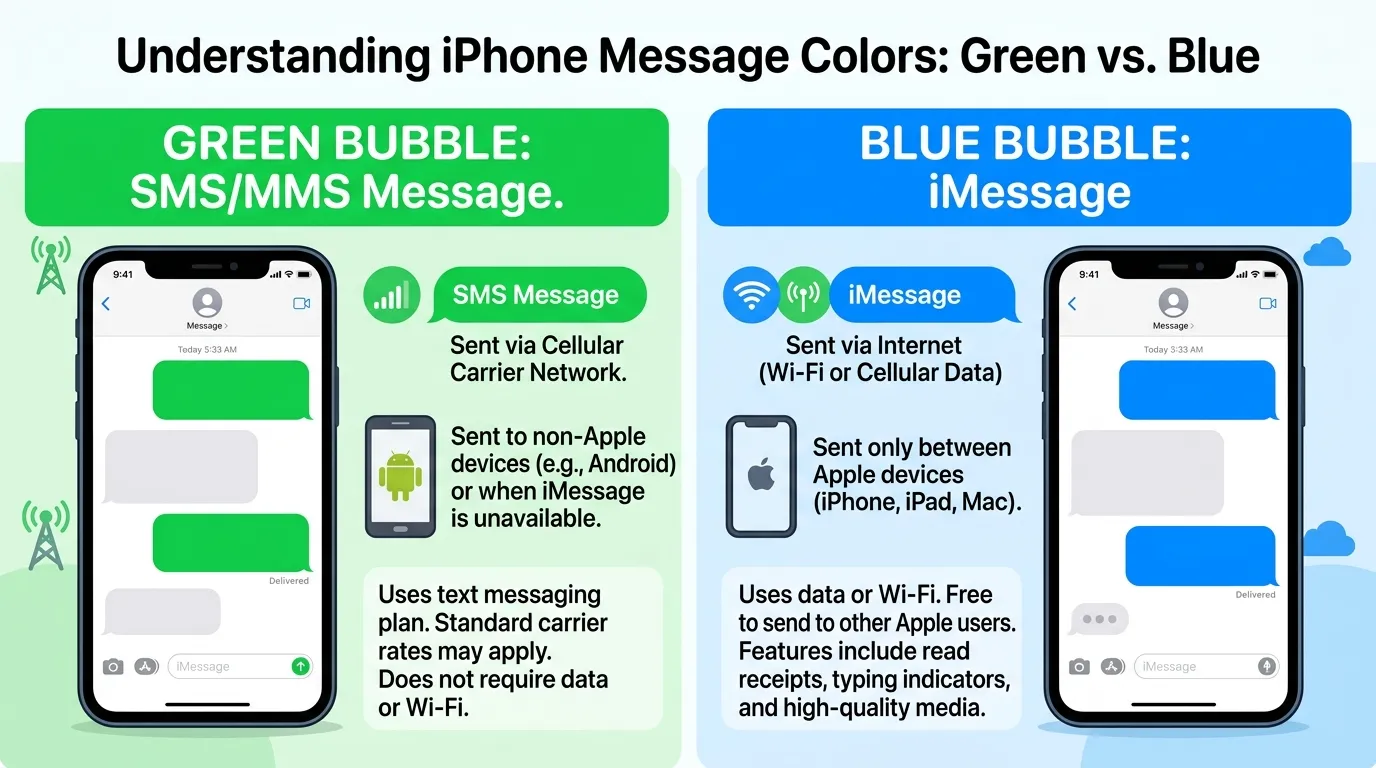
A green text on an iPhone means the message was sent using SMS, MMS, or another non-iMessage messaging method instead of Apple’s iMessage system.
In simple terms:
- Blue bubble: iMessage
- Green bubble: SMS, MMS, or supported carrier-based messaging
- Blue messages: Generally use an internet connection
- Green messages: Usually rely on your cellular carrier’s messaging network
If you normally text someone with blue bubbles and suddenly see green bubbles, it means the conversation is no longer being handled through iMessage.
That change can be temporary or permanent.
For example, imagine you regularly text your friend:
You: “Want to grab coffee later?”
If the message appears in a blue bubble, your iPhone is using iMessage.
If it appears in a green bubble, the message is being sent through a carrier-based messaging service instead.
The color itself is simply an indicator of the messaging technology being used. It is not a statement about the person you are texting.
Green vs. Blue Text Messages on iPhone
The easiest way to understand green text is to compare it with blue text.
| Feature | Green Text | Blue Text |
|---|---|---|
| Main technology | SMS/MMS or carrier messaging | iMessage |
| Bubble color | Green | Blue |
| Apple iMessage required | No | Yes |
| Internet connection | Usually not required for traditional SMS | Required |
| Common recipient | Android or non-iMessage device | Apple device using iMessage |
| Read receipts | Limited/not available in traditional SMS | Supported |
| Typing indicators | Generally unavailable in traditional SMS | Supported |
| High-quality media | More limited with traditional SMS/MMS | Generally better |
| Message reactions | More limited depending on messaging method | Fully integrated with iMessage |
| End-to-end iMessage encryption | No | Yes |
This difference explains why an iPhone can send both blue and green messages.
Your iPhone is capable of using different messaging systems. The color tells you which system is being used.
Why Are My Messages Green Instead of Blue?
There are several possible reasons your iPhone messages appear green.
1. You Are Texting an Android Phone
This is one of the most common explanations.
If you have an iPhone and the person you are texting uses an Android phone, traditional SMS/MMS messaging may appear green.
For example:
You: iPhone
Friend: Android
Your messages may appear as green bubbles because the conversation isn’t using Apple’s iMessage network.
This does not mean anything is wrong with your iPhone.
2. iMessage Is Turned Off
If iMessage is disabled on your iPhone, messages that would normally use iMessage may instead be sent as regular texts.
You can check your iMessage settings under:
Settings → Apps → Messages → iMessage
Depending on your iOS version, the location or wording may look slightly different.
If iMessage is switched off, your conversations may change from blue to green.
3. The Recipient Turned Off iMessage
The problem may not be on your device.
Suppose you always exchange blue messages with someone who owns an iPhone. Then suddenly every message to that person becomes green.
One possibility is that they:
- Turned off iMessage
- Switched to an Android phone
- Changed their phone number
- Temporarily lost iMessage activation
- Changed devices or SIM cards
The green bubble is simply telling you that iMessage isn’t currently being used.
4. iMessage Is Temporarily Unavailable
Sometimes iMessage can be unavailable because of a temporary service problem or connection issue.
If your iPhone cannot establish the necessary connection for iMessage, a message may fail to send through iMessage or may be sent through another available messaging method if your settings allow it.
5. You Don’t Have an Internet Connection
iMessage relies on an internet connection.
That connection can come from:
- Wi-Fi
- Cellular data
If you temporarily lose internet access, iMessage may not work normally.
Traditional SMS, however, can operate through your cellular carrier even when you don’t have Wi-Fi or mobile data.
This is one reason an iPhone may sometimes send a green message when you expected a blue one.
6. The Recipient’s iPhone Is Offline
A recipient being offline does not automatically mean their messages will become green. However, connection and iMessage availability can affect whether a message is successfully delivered through iMessage.
The important point is that green does not automatically mean the recipient blocked you.
Does Green Text Mean Someone Blocked You?
No. A green text does not prove that someone blocked you.
This is one of the biggest misconceptions about green messages on iPhone.
People sometimes notice that a conversation was previously blue and suddenly becomes green. They then assume:
“They must have blocked me.”
That conclusion is not reliable.
A green message can happen because the recipient:
- Switched from iPhone to Android
- Disabled iMessage
- Changed their phone number
- Temporarily has an iMessage problem
- Has a device or activation issue
- Is experiencing connectivity problems
Even message delivery behavior by itself cannot reliably tell you whether someone blocked you.
Why the Blocking Myth Is So Common
The confusion comes from the fact that blocking can affect communication between iPhone users. However, bubble color alone isn’t a reliable way to determine whether you’re blocked.
Apple does not provide a simple notification saying, “This person blocked you.”
Therefore, don’t treat a green bubble as confirmation of blocking.
Does Green Text Mean They Have an Android?
Often, yes—but not always.
If you are messaging someone whose phone does not support iMessage, such as many Android devices, your messages may appear green.
However, green bubbles can also occur when messaging another iPhone user if iMessage is unavailable or disabled.
So the more accurate rule is:
Green means the message is not being sent as an iMessage.
It does not necessarily tell you exactly what phone the recipient owns.
What Is the Difference Between SMS, MMS, and iMessage?
Understanding these terms makes the green-versus-blue issue much easier.
SMS
SMS stands for Short Message Service.
It is the traditional technology used for text messages.
SMS is designed primarily for text and has limitations compared with modern internet-based messaging platforms.
MMS
MMS stands for Multimedia Messaging Service.
It expanded traditional texting to support things such as:
- Pictures
- Videos
- Audio
- Group messages
- Other multimedia content
Depending on the carrier and device, MMS may be involved when sending certain types of green messages.
iMessage
iMessage is Apple’s internet-based messaging service.
It is built into Apple’s Messages app and is designed for communication between supported Apple devices.
iMessage provides features such as:
- Blue message bubbles
- Read receipts
- Typing indicators
- Message reactions
- Rich media sharing
- Higher-quality media in many situations
- Group messaging features
- End-to-end encryption for iMessage content
This is why blue and green conversations can feel different even though both happen inside the same Messages app.
Why Did One Conversation Suddenly Turn Green?
This situation is especially confusing.
You might have been texting someone for months with blue bubbles. Then one day, your messages suddenly appear green.
Several explanations are possible.
The Person Changed Phones
If your contact moved from an iPhone to an Android phone, the conversation may switch from iMessage to carrier-based messaging.
Their iMessage Is Disabled
They may have accidentally or intentionally turned iMessage off.
Their Phone Number Changed
iMessage activation is tied to phone numbers and Apple account information. A change in phone number or device configuration can affect how messages are handled.
Temporary Technical Problems
The person may be experiencing an iMessage activation or connectivity problem.
Your Own iMessage Settings Changed
Check your own settings before assuming the issue is on the other person’s side.
What Does Green Text Mean on iPhone Group Chats?
Group conversations can be more complicated because different messaging technologies may be involved.
If a group contains people who are not using iMessage, the conversation may use a carrier-based messaging format rather than a fully iMessage-based group chat.
This can affect:
- Bubble colors
- Group features
- Media quality
- Reactions
- Typing indicators
- Read receipts
- Other interactive features
The exact behavior can depend on the devices, software versions, carrier support, and messaging configuration of everyone in the group.
Example
Imagine a group containing:
- Three iPhone users using iMessage
- One Android user
The conversation may not behave like a traditional all-iMessage group.
This is why adding one non-iMessage participant can noticeably change the appearance and features of a group conversation.
Can Green Text Messages Be Sent Without Wi-Fi?
Traditional SMS messages can generally be sent without Wi-Fi, as long as your cellular service supports SMS and your phone has an appropriate cellular connection.
This is an important difference between SMS and iMessage.
iMessage requires internet connectivity through Wi-Fi or cellular data.
Traditional SMS primarily relies on your carrier’s cellular network.
For example, if your Wi-Fi stops working while you still have cellular service, a traditional text may still go through.
However, the exact behavior can vary depending on your carrier, device, settings, and the type of message being sent.
Does Green Text Mean the Message Was Delivered?
Not necessarily.
The color of the bubble tells you about the messaging method, not automatically about successful delivery.
A green message can be sent through a carrier-based messaging system, but whether it reaches the recipient depends on factors such as:
- Cellular coverage
- Recipient availability
- Carrier service
- Phone status
- Messaging settings
Likewise, a blue bubble doesn’t mean that the recipient has necessarily read the message.
These are separate concepts:
Message color → messaging technology
Delivery status → whether the message reached the recipient
Read status → whether the recipient opened or read it
Keeping those concepts separate prevents a lot of confusion.
What Does “Sent as Text Message” Mean on iPhone?
You may sometimes see the phrase “Sent as Text Message” underneath a message.
This means your iPhone sent the message using a traditional text messaging method instead of iMessage.
This can happen when iMessage isn’t available.
For example:
Message failed to send through iMessage → iPhone sends it as SMS if the relevant setting is enabled.
One setting that can affect this behavior is Send as SMS.
If available on your iPhone, this option allows your device to send a regular text when iMessage cannot be used.
How to Fix Green Messages on iPhone
If your messages unexpectedly changed from blue to green, you can troubleshoot the problem.
Step 1: Check iMessage
Open your Messages settings and make sure iMessage is enabled.
Step 2: Check Your Internet Connection
Try switching between:
- Wi-Fi
- Cellular data
Make sure your iPhone has a working internet connection.
Step 3: Check Cellular Service
If you are trying to send an SMS, make sure your cellular service is working.
Look at your signal indicator and try another network-dependent activity.
Step 4: Restart Your iPhone
A simple restart can resolve temporary software or connection issues.
Step 5: Check the Recipient
Ask whether the person:
- Still uses an iPhone
- Has iMessage enabled
- Recently changed phones
- Changed their phone number
This can quickly explain a sudden color change.
Step 6: Check iMessage Activation
If iMessage remains unavailable, check whether your phone number and Apple account are correctly configured for Messages.
Step 7: Update iOS
Keeping your iPhone software updated can help prevent compatibility and messaging problems.
Common Misconceptions About Green Text
Green bubbles have created several myths online.
Myth: Green Means You Are Blocked
False.
A green bubble alone cannot confirm blocking.
Myth: Green Means the Person Hates You
Definitely not.
The color is a technical indicator, not an emotional signal.
Myth: Green Means the Person Is Poor
This is an internet joke rather than a meaningful technical explanation.
A green bubble simply indicates that iMessage isn’t being used.
Myth: Every Android User Automatically Causes Green Messages
In traditional iPhone-to-Android messaging, messages may appear green because the conversation isn’t using iMessage. However, newer cross-platform messaging developments can change the underlying experience and available features.
Myth: Blue Always Means the Person Read It
No.
Blue generally indicates iMessage, while read status is a separate feature.
Green Text Meaning in Different Social Situations
The meaning of green text can feel different depending on the situation.
When Texting a Friend
A green bubble usually means nothing socially significant.
You are simply using a different messaging method.
When Dating
Some people attach social meaning to green bubbles because of online culture. You may see jokes about “green bubble relationships” or debates about iPhone versus Android.
But technically, the bubble color says nothing about compatibility, interest, or personality.
At Work
A green message may simply indicate that you’re contacting someone through SMS rather than iMessage.
For business communication, don’t interpret the color as a sign of urgency or importance.
On Social Media
TikTok, Reddit, Instagram, and other platforms have popularized jokes about green bubbles versus blue bubbles.
These discussions are often cultural rather than technical.
The internet may turn the color into a social status symbol, but Apple’s actual explanation is much simpler: it indicates the messaging service being used.
Why Do People Care So Much About Green Bubbles?
The green-versus-blue debate has become part of smartphone culture.
Apple’s blue iMessage bubbles are closely associated with the iPhone ecosystem. Over time, the colors became more than a technical distinction.
Online conversations sometimes use:
- “Blue bubble”
- “Green bubble”
- “Green text”
- “Android text”
- “iMessage”
- “SMS”
as shorthand for different phone ecosystems.
This has created memes and social discussions around texting, dating, friendships, and group chats.
However, it is important to separate cultural meaning from technical meaning.
Technically:
Green = not iMessage
Culturally:
Green bubble = a topic people sometimes joke or argue about
Those are two different things.
Green Text vs. Blue Text: Which Is Better?
Neither color is automatically “better.”
They simply represent different messaging systems.
Blue iMessage messages generally offer a richer set of Apple-specific features, while green SMS/MMS messages provide broad compatibility with devices outside Apple’s iMessage ecosystem.
For example:
Blue is useful for:
- Apple-to-Apple communication
- Rich messaging features
- Read receipts
- Typing indicators
- iMessage group chats
Green is useful for:
- Communicating with non-iMessage devices
- Traditional SMS communication
- Situations where iMessage isn’t available
The best option depends on the devices and services involved.
Practical Examples of Green Text Messages
Here are several realistic situations.
Example 1: iPhone to Android
Alex: “Hey, are we still meeting at 7?”
Jordan: “Yep!”
If Alex uses an iPhone and Jordan uses an Android phone, Alex may see Jordan’s conversation as green.
Example 2: iMessage Turned Off
Sam: “Why are my messages to you green?”
Taylor: “Oh, I turned iMessage off yesterday.”
In this case, the recipient still has an iPhone.
Example 3: Temporary Problem
Chris: “My messages are suddenly green.”
Jamie: “Mine too. Maybe iMessage is having an issue.”
Here, the change may be temporary.
Example 4: New Phone
Morgan: “Did you get a new phone?”
Taylor: “Yeah, I switched from my iPhone to Android.”
The change in device can explain why their messages are now handled differently.
What Should You Do If Your Text Turns Green?
Don’t panic.
Instead, think through the situation logically.
Ask yourself:
- Does the recipient use an iPhone?
- Is iMessage enabled on my device?
- Do I have an internet connection?
- Did the recipient recently change phones?
- Are other iMessage conversations still blue?
- Is my cellular service working?
- Did the message specifically say it was sent as a text message?
If only one person’s messages are green, the issue may be related to that person’s device or iMessage status.
If all of your previously blue conversations have suddenly turned green, check your own iMessage settings and internet connection first.
Important Terms Related to Green Text on iPhone
Several terms often appear in searches about this topic.
iMessage
Apple’s internet-based messaging system that uses blue bubbles.
SMS
Traditional cellular text messaging.
MMS
A messaging standard that supports multimedia content.
RCS
A newer messaging standard that can provide richer features than traditional SMS/MMS. Apple has added support for RCS messaging on supported iPhones and carriers, improving communication between iPhones and compatible Android devices.
Blue Bubble
An informal term for an iMessage conversation.
Green Bubble
An informal term for a message sent outside the iMessage system.
Quick Summary: Green Text Meaning on iPhone
| Question | Answer |
|---|---|
| What does green text mean on iPhone? | The message is not being sent as iMessage. |
| Does green mean Android? | Often, but not always. |
| Does green mean you’re blocked? | No, not by itself. |
| Does green require Wi-Fi? | Traditional SMS generally does not. |
| Does blue mean iMessage? | Yes, in the Messages app. |
| Can another iPhone receive green texts? | Yes, if iMessage isn’t being used. |
| Can green messages include pictures? | Yes, depending on the messaging technology and carrier support. |
| Is green text bad? | No. It is simply a different messaging method. |
| Can green messages be temporary? | Yes. iMessage availability can change. |
| Does green mean the person read your text? | No. Bubble color and read status are different. |
Frequently Asked Questions
What does a green text message mean on iPhone?
A green text message means the message was sent using a non-iMessage messaging method, traditionally SMS or MMS. This commonly happens when texting an Android user, when iMessage is disabled, or when iMessage isn’t available.
Why are my texts green to one person but blue to everyone else?
That usually means something is different about that specific conversation. The recipient may have switched phones, disabled iMessage, changed their number, or temporarily lost iMessage activation.
Does a green message mean someone blocked my number?
No. A green message is not reliable evidence that someone blocked you. Several normal technical reasons can cause messages to appear green.
Why did my iPhone messages turn green overnight?
Possible reasons include an iMessage outage, disabled iMessage, an internet connection problem, changes to your phone or SIM configuration, or the recipient switching devices.
Can an iPhone text an Android phone?
Yes. iPhones can communicate with Android phones using carrier-based messaging and, on supported devices and carriers, newer messaging standards such as RCS. The exact features depend on the devices and carrier support.
Can green messages have read receipts?
Traditional SMS does not provide the same iMessage read-receipt system. Availability of read status can depend on the messaging technology being used.
Can I turn green messages blue?
You cannot simply change a green bubble to blue with a color setting. A message becomes blue when it is sent through iMessage and the relevant requirements are met on both sides.
Does green text mean the recipient has an Android phone?
Not necessarily. Android is a common reason for green messages, but an iPhone user can also receive or send green messages when iMessage isn’t being used.
Why are my group messages green?
A group conversation may use a different messaging system when participants aren’t all communicating through iMessage. The available features can therefore differ from an all-iMessage group.
Is green text a sign that something is wrong with my iPhone?
Not necessarily. If you’re intentionally texting someone through SMS or another non-iMessage system, green is completely normal. If a conversation unexpectedly changed from blue to green, checking your iMessage settings and connection can help identify the cause.
Final Takeaway
The green text meaning on iPhone is straightforward: your message is being sent through a messaging system other than Apple’s iMessage.
Most commonly, this happens when you’re texting someone who isn’t currently using iMessage. But green messages can also appear when iMessage is disabled, unavailable, improperly activated, or affected by connectivity or device changes.
The most important thing to remember is that green does not automatically mean you’ve been blocked. It also doesn’t indicate anything about someone’s feelings, intentions, or relationship with you.
Think of the colors as technical labels:
Blue = iMessage
Green = non-iMessage messaging
Once you understand that distinction, the green bubble becomes much less mysterious.
If your messages unexpectedly turn green, check your iMessage settings, internet connection, cellular service, and the recipient’s device before jumping to conclusions. In most cases, the explanation is technical—not personal.
Ultimately, the green text on iPhone is simply a visual clue showing how your message traveled from your phone to the recipient. The color may have become a major topic in smartphone culture, but its actual meaning is much simpler than the internet jokes suggest.